Map every LED cabinet down to the pixel.
Configure cabinet grids, stretch screens across multiple cabinets, and export production-ready layouts. Built by ControlRoomTools.com.
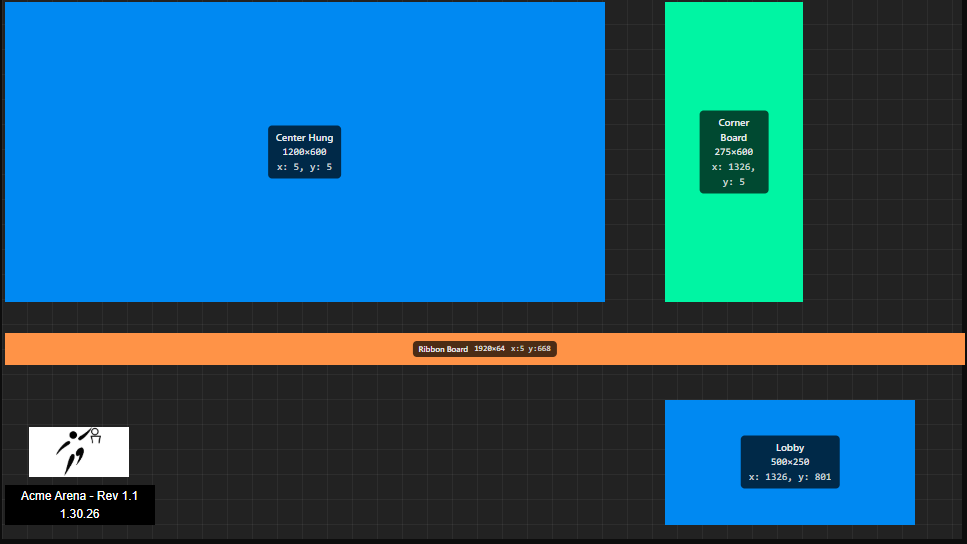
Built around how installs actually get planned.
Six tools that cover cabinet layout, canvas management, and export. Nothing you don't need.
Cabinet grid system
Configure exact rows, columns, and pixel pitch per cabinet, up to full UHD (3840×2160), then reuse the same grid across every screen in a project.
Multi-canvas support
Manage separate display zones and outputs inside one project file, right in the browser. No installation required.
Multi-format export
Export high-resolution PNG references or JSON data for downstream systems and vendors.
Spanning screens
Stretch a single screen across multiple cabinets with pixel math handled automatically.
Smart snapping
Snap to grid lines and cabinet edges for layouts that line up exactly.
Screen grouping
Group related screens so moving or editing one updates the whole set.
From blank canvas to exportable layout.
Three steps, no manual pixel math.
Set up your project
Create a free account and start a new canvas sized to your video wall.
Build the layout
Configure your cabinet grid, place screens, and let snapping keep everything aligned.
Export and share
Generate PNG references or JSON data and hand them straight to your crew.
Free to use. No catch.
Every feature, unlimited projects, no credit card required.
The complete LED mapping toolkit
Free account required to save projects to the cloud.